
|
Home Table of Contents News Dev Blogs Gallery Timeline Legend Tags Sponsors |
|
Join us on... |

|

|

|

|
|
Home Table of Contents News Dev Blogs Gallery Timeline Legend Tags Sponsors |
|
Join us on... |
|
|
|
Current: Month Day, Year
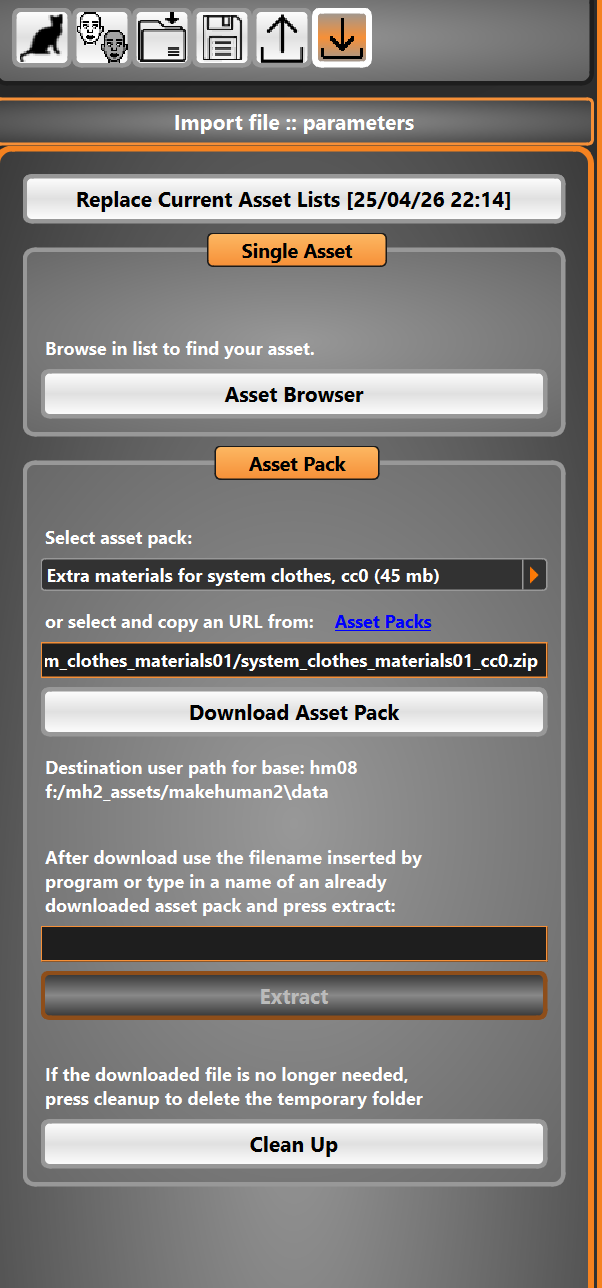
From within Makehuman 2 you can download the assets you need to build a standard human and much more!
Please see the Photo below as a reference!
To begin- Visit the download asset page by clicking the download icon in function panel.
Once this page loads you will see options on the left to download assets and open up the asset browser window.
Hint: The download is normally bound to a mesh (except for skybox or background), so you currently will only see a list files when you select base hm08 or a mesh has a parameter parentmesh=“hm08” in the base.json file (e.g. fantasy mesh)
To get a full overview of the available assets and asset packs, you need to download the asset list once. We recommend doing that, although a few links are already inserted by default.
Select your downloads link from the drop down menu. We recommend the download of:
Click on download asset packs.
Alternatively you can open the asset browser window, find your items here and click download here as need be.
Once you have your content downloaded, in the same window you can then extract the items to their respective
files where you chose to install your CC.
As an extra measure, clean your unused zip files by clicking cleanup button at bottom of the same window.
This is essentially not needed anymore but if you may choose to leave these for a backup if you intend to work
offline.
The program can also download a new base mesh and the complete morphs and everything which is needed. This mesh will be placed in user space, targets will be in a folder contarget not to collide with the user-target folder. This is a way to update the normal version with the fantasy mesh.
A file starting with newbase_<meshname>.zip will install a new base mesh of “meshname”.